I bought a cheap USB fingerprint reader that was sold for Windows Hello. On Linux it did not work properly. It is a Focal-systems FT9201, USB ID 2808:93a9.
I had tried to fix that once before, in April. I got the sensor detected, started and returning images, then stalled on matching. The sensor's picture is only 96 by 96 pixels, and the matcher that libfprint, Linux's fingerprint library, uses does a poor job on an image that small. I had hit the limits of what I knew, so I put the project down.
The idea that worked
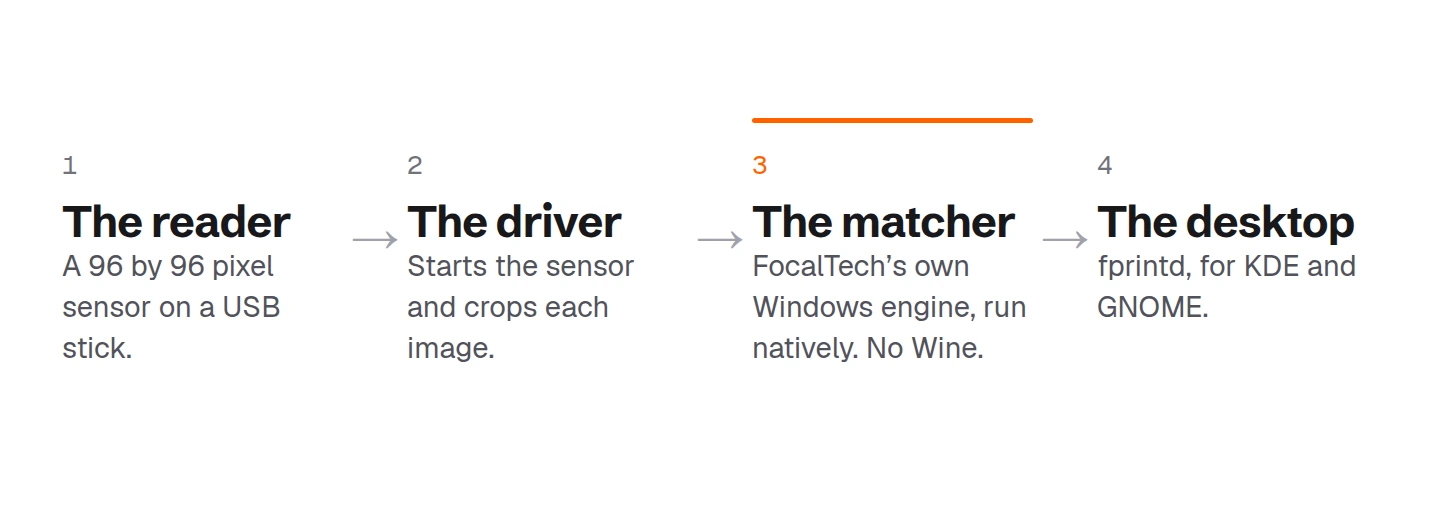
In July I came back with a different idea. Instead of building a better matcher, use the one the maker already wrote. FocalTech's Windows driver contains its own matching engine, a file called ftWbioEngineAdapter.dll. If Linux could run that file, the reader would match fingers with the maker's real algorithm.
It can. A small loader, about 450 lines of C, maps the file into memory, supplies the roughly 90 Windows system functions the engine imports, sets up a stand-in for the per-thread data Windows would provide, and calls the engine's fingerprint interface to enroll and verify. There is no Wine and no Windows underneath.
The loader never makes a page of memory both writable and executable, so it runs under fprintd's default memory protection. Nothing has to be switched off.
The rest is plumbing. The driver boots the sensor, takes each image, crops it to the 64 by 80 pixels the engine expects, and hands it over. fprintd does the enrolling and checking, so the reader works in the KDE and GNOME settings and for login.
The revival took a day. I started on July 9 and a full enroll and verify worked on July 10.
What it needs, and what it does not do
The repository contains no proprietary files. When you build it, a script fetches the matching engine from Microsoft's update catalog and the sensor's firmware from a public copy. It has been tested on one reader, the FT9348W variant of the 2808:93a9, and it only runs on 64-bit x86. The matcher is a closed file I call into, so I cannot fix bugs inside it.
The same method should work for other readers sold only for Windows Hello, and the repository includes a guide for trying it. I have only proved it on this one.
Why I did it
I like finding the gaps in technology and filling them. A reader that works on one operating system and not another is a gap, and AI makes it quicker to fill than it has ever been. That is the part I care about: using AI to make hardware accessible to every operating system, not only the one it shipped for.
The code is on GitHub, with a longer technical writeup, and I shared it on r/Linux. The USB protocol was first worked out by banianitc's FT9201 driver, and the firmware and start-up sequence were checked against a public copy from mrrbrilliant. I built on their work.